
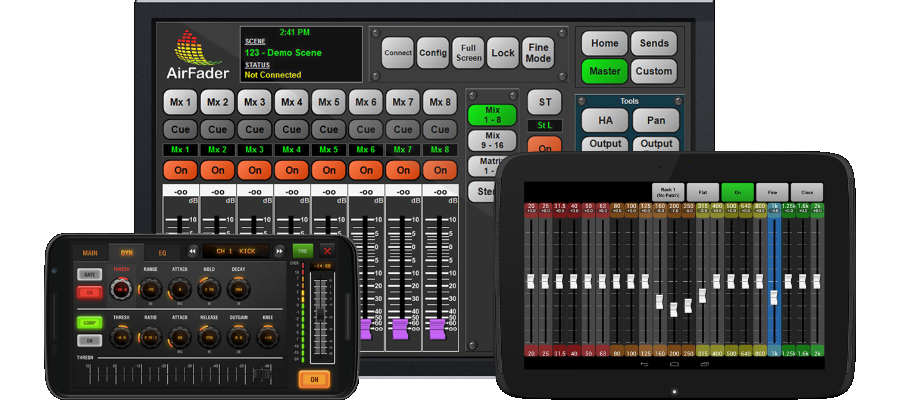
What is AirFader?
AirFader is touch-screen friendly software designed by an audio engineer for remote control of Yamaha digital consoles. It has set the standard for tablet mixing for nearly a decade.
AirFader has always been independently-developed to be a reliable and efficient tool, not eye candy to sell consoles. It's currently available for the Yamaha M7CL and LS9 - and is a surprisingly popular addition to the great-sounding Yamaha 01V96i!
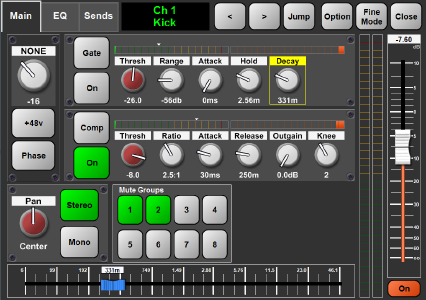
AirFader provides control of most channel-based parameters using a fast, intuitive interface. Screens are not cluttered, yet you can access the most common parameters in two taps or less.
AirFader's unique horizontal "Param Fader" provides linear control of any knob on the screen, plus "Fine Mode" makes all controls more sensitive to small adjustments.
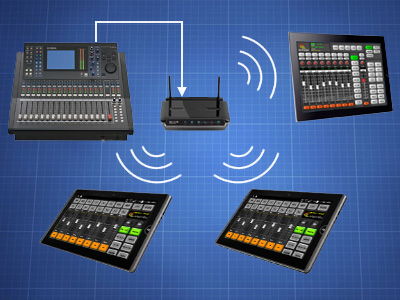
AirFader is actually a powerful logic processor with its own efficient communications protocol. It ensures commands get routed between the console and other devices quickly.
The Server mirrors everything that happens in the console so that if a mobile device disconnects, it can re-sync in less than one second. So if your device goes to sleep don't worry - it will pick up where you left off.
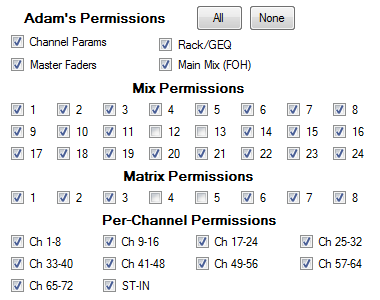
Each remote user can be configured to have access to any combination of mixes including the main FOH mix. Or not. Access to per-channel parameters, the Graphic EQs, and Master faders can also be restricted.
A musician could be given access to change "Mix 6" only, with no access to EQ. A worship leader could have access to change any monitor mix, and EQ, but not the Front of House mix.
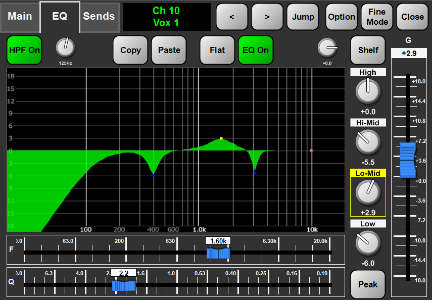
The Parametric EQ curves and level meters in AirFader aren't just pretty - they're pretty accurate. The EQ graphs are not visual approximations,they were created by sampling the console's actual behavior. Level meters follow the same non-linear scale as the surface meters.
Even the console's nonlinear fader curves have been carefully modeled so the virtual fader velocity matches the physical faders perfectly. It just feels natural.
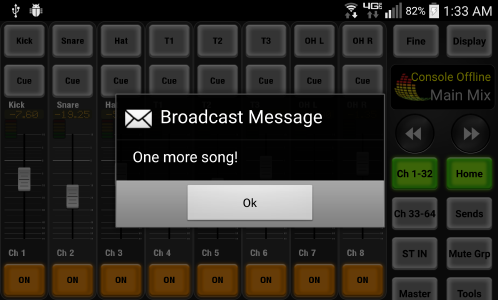
AirFader has several ways to send signals between users. The Windows version has the ability to remotely flash the console lamp on and off. The console operator can use one of the User Defined Keys to display an alert in Windows. These work like an intercom flasher.
AirFader Server can also deliver short messages to one or all remote devices, allowing you to discreetly pass along song requests, weather warnings, sports scores, or just remind them of the end of their set.


 AirFader Standard Edition
Microsoft Windows, $99.00
Features • Buy Now
AirFader for Windows allows you to control a Yamaha 01V96, LS9, or M7CL from a Windows desktop or laptop. In addition, it allows you to connect one android or iPad tablet using the free AirFader Mobile app. It is intended for engineers using AirFader to adjust the EQ or mix from around the room, or adjust monitors from stage.
 AirFader Server Edition
Microsoft Windows, $149.00
Features • Buy Now
The Server Edition allows you to connect any combination of Android and iPad devices to a Yamaha 01V96, LS9, or M7CL by using the Windows computer as a server. It is designed to be the core of a personal monitor mixing system. Since the remote client is free, musicians can use their own personal devices at no cost. This gives each musician control of their own mix (and ONLY their mix) and works with existing in-ear monitors, wedges, or headphone amps. Users just connect to the network, enter the server information, and go!
 AirFader LS9 Pro
android, $19.95
Features • Buy Now
This app is perfect for engineers who want to connect a single android device directly to a Yamaha LS9. It provides access to almost all mixing-related features we support, but does not allow multiple devices and does not provide permissions controls.
 AirFader M7CL Pro
android, $19.95
Features • Buy Now
This app is perfect for engineers who want to connect a single android device directly to a Yamaha M7CL. It provides access to almost all mixing-related features we support, but does not allow multiple devices and does not provide permissions controls.
 AirFader Mobile